
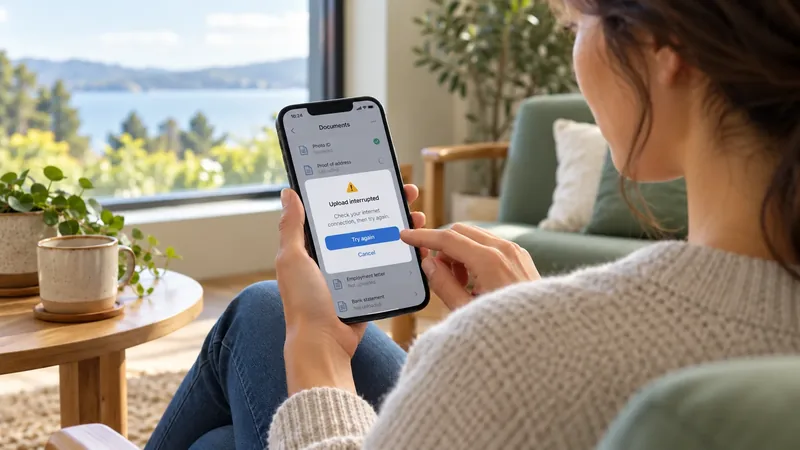
An error message reaches a user at a difficult moment: a file will not upload, a form will not be submitted, or an operation has stopped unexpectedly. In another language, the message still needs to explain the problem and offer an appropriate next step. Translating the words accurately is only part of the task. The guidance must also match what the software knows, what the user can do, and what the application will do next.
Error message language design brings those decisions together. For localization managers and product teams, it means giving translators enough context to preserve intent while making the wording natural and actionable. Terralíngua provides software interface localization and technical documentation translation, including notifications, help content, and troubleshooting instructions. However, developers and product owners still retain responsibility for the behavior that the translated language describes.
Terralíngua’s software and technology localization services
Start Error Message Design with the Product State
Before discussing tone or sentence length, establish what has happened. Was the request rejected before processing, partly completed, or completed without confirmation reaching the user? Does the application know the cause, or only that the operation did not finish? These distinctions affect whether a message should recommend editing an input, checking a result, waiting, or contacting support.
“Try again” is useful only when retrying is an approved action. It should not be added as a friendly ending to every failure message. A translator cannot determine from an isolated string whether a retry might create a duplicate request or whether the user’s changes have been preserved. The development team should supply those facts and approve any proposed change to the recovery wording.
Classify messages by the decision they support. A missing required field calls for different language handling from a permission restriction or an unavailable service. A notification about an operation still in progress should not sound like a confirmed failure. Describe the trigger, the known outcome, and the permitted next step in the source brief so each language begins with the same understanding.
Give Translators More Than a String Export File
An exported string file preserves the text to be translated but rarely explains the entire interaction. Add context that connects each message to its screen and user action. Screenshots, short recordings, or access to a reference build can show whether the text appears beside a field, in a dialog, or in a temporary notification. It is also helpful to identify the relevant product version and intended audience relevant to the localization process.
- Stable resource key and source text, with the message’s trigger and purpose.
- Screenshot or screen reference, including nearby labels and available actions.
- Definitions and sample values for variables, plus protected error codes and formatting syntax.
- Known limits on length, lines, or display time, distinguishing technical limits from preferences.
- Approved recovery instructions, help destination, and any access requirements.
- Product contact who can resolve questions about behavior and approve source revisions.
Explain whether a message is shared between several situations. Reusing one string may look efficient, but identical English wording can require different grammar or a different action label elsewhere. If a shared message cannot work accurately in every context, the translator should raise the conflict with the client product content owner. The product team then decides whether to separate resources or revise the interaction; localization also should not change the interaction’s meaning to fit onto a screen.
Separate the Problem from the Next Step
A useful source message tells the reader what did not work and, when known and appropriate, how to proceed. Avoid translating internal terminology into an action. “Validation failed” identifies a software event but may not explain which input needs attention. A specific instruction about the affected field is more useful when the application can reliably identify that problem.
For example, consider a file upload form that accepts PDFs only. Instead of “Invalid format,” an approved source message might read, “Choose a PDF file to upload.” This wording is appropriate because it explains the failure as the file type. However if the issue is the upload service is unavailable, the same instruction would send users toward a correction that cannot resolve the problem.
The World Wide Web Consortium’s (W3C) explanation of Web Content Accessibility Guidelines (WCAG) 2.2 criterion, section 3.3.3 addresses automatically detected input errors. It advises known correction suggestions should be provided unless they would jeopardize the security or the content’s purpose. This is a specific accessibility criterion, not a rule to disclose every technical cause. Product and security owners should decide which recovery detail can be shown; and translators should preserve that approved boundary.
W3C guidance on error correction suggestions
Keep the action close to the problem where the interface allows it. A button labeled “Choose a file” may be clearer than “OK” when it actually opens a file picker. The label, message, and implemented action must agree in each language. Do not translate an acknowledgment button as a recovery command when dismissing the dialog is all it does.
Keep Error Identifiers Stable and Explanations Readable
Distinguish the resource key used by developers, the error code shown to users or support, and the explanation intended for the reader. They serve different purposes. Protect resource keys and approved diagnostic identifiers in the translation process. Translate the surrounding explanation and labels where required, while retaining the exact code that supports what the instructions expect.
In this example, “Reference code: UP-204” may accompany a localized explanation. The label can change language; but UP-204 should remain unchanged under the agreed rules. Preserve its case, punctuation, and digits. If a code can be included in a support request, developers should verify that the interaction still copies the intended identifier rather than add extra translated text.
A code alone does not explain what users should do. Conversely, replacing a code with shortened text may remove the information support needs. Agree with which identifiers are visible to the user and where they appear. Developers also decide what diagnostic content is appropriate for the audience; note that translators should not expose internal details or invent explanations for unfamiliar codes.
Handle Variables as Part of the Message
Variables can add changing content to the project including file references, numerical considerations, or size limits. Document placeholder constraints and considerations including formatting. Protect its required syntax but allow word order to follow the target language conventions where the message format supports it. International Components for Unicode (ICU) documentation recommends translating complete messages rather than fragments, so translators can arrange variable elements within natural sentences.
Plural handling also needs language style consideration before implementation. ICU describes selecting message variants according to the language’s plural rules. An English singular-and-plural pair is not a universal template for every target language. Confirm the format supported by the application and provide complete messages for the required cases. Developers must validate the resulting resources in the actual message format application.
Unicode ICU documentation on formatting translatable messages
Consider this sample size-limit message, “Choose a file smaller than {limit}” is ambiguous until the team explains whether {limit} contains a number, a formatted size with its unit, or something else. Confirm whether the limit is inclusive to the content. Translating “smaller than” as “up to” could change the stated rule. The product owner should confrim the source meaning before the text is localized across languages.
Use representative sample values during review. A short file name may fit, while a long one obscures the action text. A variable may be empty, contain punctuation, or mix writing directions with the surrounding text. The language team can identify readability problems; developers control rendering, escaping, and layout behavior. Do not resolve a technical problem by deleting the necessary placeholder from the translation as it may affect the function.
Use a Professional Tone
State the problem plainly and avoid blaming the reader’s error. “Enter a date in the required format,” is usually more useful than, “You entered the wrong date,” provided the required format is clear. A brief apology can suit a service failure, but repeated apologies should not crowd out the action. Humor and idioms may be especially awkward when users are concerned about lost work.
Give translators a style tone guide that allows natural local phrasing rather than requiring literal sentence patterns. Explain the audience’s technical familiarity and the level of formality expected. Politeness conventions can vary, but the essential facts should remain stable: what happened, what is known about the result, and which action is available. A warm tone should not weaken a necessary restriction or exaggerate the severity of a minor correction.
Treat reassurance as a factual claim. “Your changes are safe,” “No payment was taken,” and “This will only take a moment,” require product confirmation. If the system cannot establish the result, the source should communicate that uncertainty and direct users to the approved method to check. Translators should not add certainty simply because it sounds more reassuring.
Connect Messages to Approved Recovery Instructions
Localized recovery guidance may extend beyond the message itself. A short notification can link to a procedure with screenshots or several steps. Identify the exact approved article and applicable product version, then confirm whether the target-language procedure exists. Do not assume that replacing a language segment in a URL will produce a valid destination.
The linked instructions must fit the situation that triggered the message. A user without administrator permissions cannot necessarily follow an administrator-only procedure. If a help page requires sign-in, check whether someone experiencing a sign-in error can reach it. When a localized page is unavailable, agree on the fallback and explain the destination’s language where appropriate rather than implying that translated help exists.
Translate the recovery article with the current interface and message available as references. Preserve the action sequence, conditions, and stated consequences. If instructions include removing data or changing settings, those steps need product approval; the language team must query the right contacts, not simplify a condition that changes the outcome. Assign ownership for content confirmation by checking the link and procedure when the product changes.
Review Software Notification Context in the Interface
Software notification context includes what users were doing to receive a message and how much of it they can view in different steps. A narrow mobile dialog, an inline validation message, and a temporary desktop notification provide different reading conditions. Review the translation in the intended presentation, including longer target-language text. A spreadsheet can show correct wording while hiding a clipped sentence or an action pushed out of view.
World Wide Web Consortium (W3C)’s explanation of Web Content Accessibility Guidelines (WCAG) 2.2 criterion, section 3.3.1 says that automatically detected input errors must identify the affected item and describe the error in text. A color change or icon alone is not a substitute for the description. This makes the localized wording important, while leaving the implementation and broader accessibility assessment with the product team.
W3C guidance on identifying input errors in text
Include keyboard and assistive-technology behavior in the client’s testing plan where relevant. Linguists can review the words presented or announced, but an approved translation does not establish that the notification is announced at the right time or associated with the correct field. Similarly, readable right-to-left text does not prove that mixed-direction identifiers or controls behave correctly. Assign these checks to qualified product testers.
Validate the Message and the Recovery Path Together
Use a review matrix that connects each resource to a reproducible scenario. Record the trigger, expected message, available action, variable samples, help destination, and responsible reviewer. Prioritize unclear or consequential situations during an early review, while agreeing on the review coverage process for the full message set. A handful of polished screenshots is not evidence that every error and state have been checked.
Referring to our fictional PDF upload example, the reviewer should purposefully trigger a file-type rejection, read the translated instruction, and test the offered action. Next, trigger an unavailable service state and confirm that it produces the correct, appropriate guidance. This comparison tests the connection between language and condition. It can reveal a mapping error even when both translations on their own are individually correct.
- Language acceptance: wording preserves the approved meaning, distinguishes uncertainty from failure, and offers only authorized actions.
- Resource acceptance: required keys, codes, placeholders, and formatting syntax are preserved and pass developer validation.
- Presentation acceptance: text and actions remain readable in the agreed screens, languages, and representative variable cases.
- Recovery acceptance: the action and help link lead to the approved outcome or instructions for the user’s role and product version.
- Approval record: product questions are resolved and the responsible owners approve file release.
Keep language review separate from functional sign-off. Translators should record issues with a resource key, specific language questions, related screenshots, and explanation of the concerns. Developers should confirm behavior and implement changes; then the client’s product owner should resolve disagreements about the intended experience. If source wording changes after review, assess which language versions and recovery documents also need review and confirmation.
Plan Deliverables and Review Time
Scope the assignment around the complete message set and its context, not word count alone. Many short strings can require substantial clarification. Variables, multiple error conditions, restricted review environments, and untranslated help destinations all affect effort. A representative sample should include complex messages and their related screens so the required language and testing responsibilities can be discussed before production.
Agree on the final deliverables such as the approved format for localized resource files, approved translated recovery articles, confirmed terminology and tone decisions, and a query or issue reference log. Build time into the schedule for product answers, integration, and in-context review. Define the current source version and approved change process. Please note these are proposed project controls, not a claim that translation alone delivers a tested or accessible software release.
Frequently Asked Questions
Can We Translate Messages Before the Screens Are Finished?
Yes, if the team supplies reliable context and marks unresolved behavior. Use provisional screenshots or descriptions, then schedule review in the implemented interface. Treat later changes to actions, variables, or recovery steps as possible future translation changes to confirm again, rather than assuming the original wording will still fit with the final files.
Should Every Error Include a Support Link?
No. A direct input error may only need correction with a clear instruction. Add a support or help route when it offers an appropriate next step and verify that the affected user can access it. The product team should approve the escalation path.
What If the Translated Text Exceeds the Character Limit?
First confirm whether the limit is technically enforced or a design preference. A linguist can propose shorter wording for approval that preserves meaning. If essential guidance will not fit after modification, the product team should consider the presentation or message structure rather than remove the necessary condition.
Prepare Your Error Messages for Localization
Terralíngua’s ISO certified software localization and multilingual technical documentation services can support any language users encounter in system notifications and the related instructions. Its published approach uses product context, client references, and industry terminology. Discuss interface strings and recovery content together during the quoting stage, as well as assign the developers responsible for resource integration, application behavior, and release approval.
For an assessment, provide a representative resource export, screenshots or reference build, required target languages, placeholder definitions, and approved recovery instructions. Include the product version, technical constraints, review contact, required deliverables, and deadline. With these defined inputs, the localization work can address the user decisions rather than translate an error message in isolation.
Request a quote for software localization and technical documentation translation