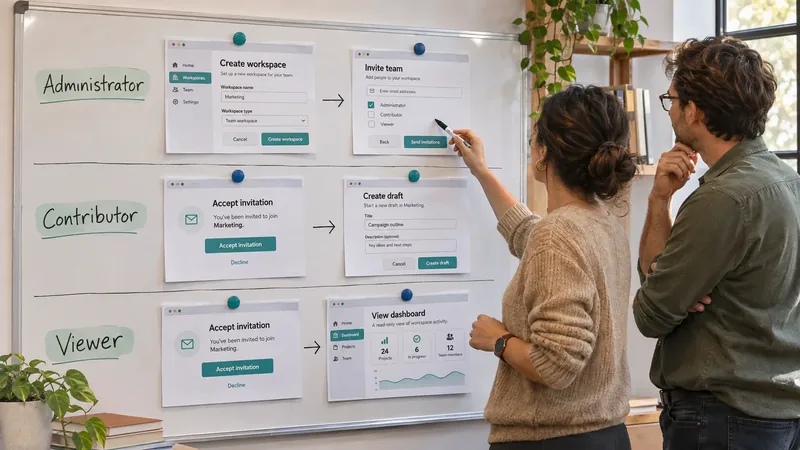
A welcome message tells a new user to invite colleagues, but that user can only view information. Another prompt asks an administrator to connect a data source before the organization has supplied access. The wording may be fluent in every language and still lead people into a dead end. Role-based onboarding localization addresses this problem by connecting translated guidance to the audience, permissions, and prerequisites behind each step.
The language work includes setup explanations, welcome emails, guided tours, role-specific prompts, and contextual help. Buyers need to know which materials to provide, how to resolve differences between journeys, and what reviewers should approve. Terralíngua provides software localization and technical translation; an onboarding assignment can bring interface wording and supporting explanations into an agreed language scope. Product owners retain responsibility for deciding what each role can do and when an instruction should appear.
Start Role-Based Onboarding Localization with the User’s Task
A role is not just a job title or a level of experience. In software, it may determine which actions are available within a particular workspace, project, or account. A person might administer one workspace and only view another. A first-time administrator may also need more explanation than an experienced contributor. Keep permission, experience, and organizational responsibility separate when describing the intended reader.
Microsoft’s Azure documentation provides a useful product-specific example: a role assignment combines an identity, a role definition, and a scope. Other products implement access differently, so Azure’s model should not be copied into an unrelated application. The practical localization lesson is to ask which actions and areas a role actually covers rather than translating an isolated label such as “owner” and assuming its meaning.
Microsoft Learn: Roles, Permissions, and Scope in Azure RBAC
For each journey, record the task the reader should complete and the condition that makes it possible. An administrator may create a workspace and invite users; a contributor may accept an invitation and create a draft; a viewer may open an existing dashboard. These are illustrative roles, not universal definitions. Have the product owner confirm the actual roles and approved terminology before translators start interpreting them.
Map the Messages Around Each Journey
Onboarding rarely lives in one resource file. An invitation email can lead to an acceptance screen, a welcome panel, a checklist, and a help article. A product tour may also use content managed outside the main application. Inventory those touchpoints together so that a translated setup journey does not begin in one language and unexpectedly continue in another.
- Entry messages: invitations, welcome emails, sign-in explanations, and links into the product.
- Setup guidance: checklist items, prerequisite notices, field instructions, and completion messages.
- Role-specific prompts: permitted actions, requests for assistance, and explanations of unavailable steps.
- Contextual help: tooltips, linked instructions, and short explanations beside the task.
- Return visits: reminders, interrupted setup, completed steps, and changes in role.
Give each item a stable identifier and connect it to its journey, screen, and source version. Record whether it is shared or role-specific. This allows reviewers to follow a sequence rather than assess disconnected sentences. It also exposes missing material: for example, a welcome email may already mention an invitation process whose help article has not been included in the translation request.
Keep permission differences separate from subscription and deployment differences. A feature might be unavailable because the account has a different plan, because an integration is not configured, or because the current role lacks access. Those conditions require different explanations. Ask the product team to identify the cause that each message represents. Do not translate every unavailable feature as a permission restriction, and do not imply that purchasing a plan will resolve an administrator-controlled setting.
Explain Dependencies Before Asking for Action
A prerequisite is something that must already be true before a step can succeed. In onboarding, it may be a workspace created by someone else, an approved invitation, a configured integration, or access granted at a particular level. Describe these dependencies in the source package. The translator should not have to infer them from a disabled button or a screenshot taken after setup was completed.
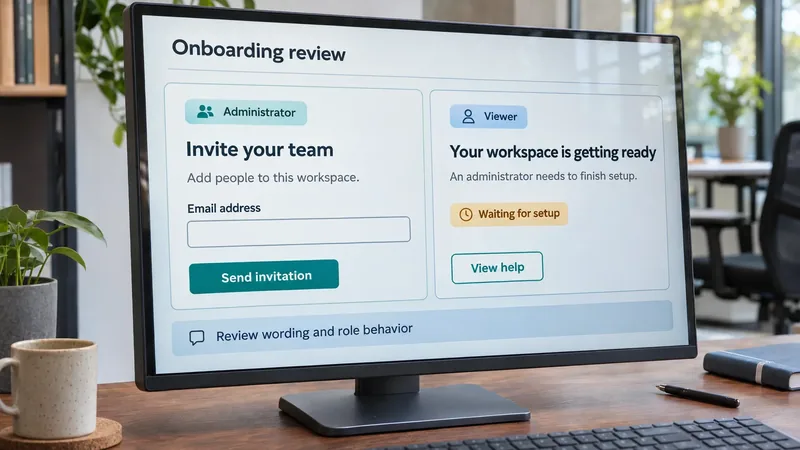
Consider a fictional reporting application. Its source says, “Connect your data to get started.” That may suit an administrator with the required access, but not a viewer whose team has yet to finish configuration. The viewer’s approved version might instead explain that an administrator needs to complete setup and offer relevant help. The change is a product-content decision requiring approval, not a discretionary correction to make during translation.
Be precise about the next step. “Contact your administrator” is only useful if the product or organization provides a workable way to identify that person. “Request access” should not imply a request is submitted when the button merely opens instructions. Ask the owner to resolve these gaps before localization. Preserve distinctions between waiting, asking, and completing an action in each language.
Provide Onboarding Prompt Context with the Source
A spreadsheet containing “Continue,” “Owner,” and “Ready” leaves substantial room for interpretation. Is “Owner” a formal permission role or the person responsible for a task? Does “Ready” describe an account, a connection, or the user? Supply the surrounding sentence, the screen, the role, and the result of the action. Context should travel with the string, not remain in a separate conversation that only one reviewer saw.
A useful context record includes the content identifier, audience, trigger, preceding step, next destination, and relevant limits. Add a screenshot or short recording when the sequence matters. If a string appears in multiple places, identify those uses explicitly. Access to a test environment can help, but it does not replace a written explanation of hidden conditions or a source owner available to answer questions.
W3C’s XML internationalization guidance discusses notes for localizers and stable identifiers. Although the document concerns XML, the underlying practice is useful when preparing onboarding content in other formats: preserve a dependable connection between text and its explanation. Choose a context mechanism compatible with the actual product and translation tools; adopting XML is not a requirement for the project.
W3C: Best Practices for XML Internationalization
Decide Which Wording Can Be Shared
Identical English strings do not always have identical functions. “Join” might accept an organization invitation in one journey and enter a temporary session in another. Combining those strings under one identifier can force an unsuitable translation into one location. Conversely, maintaining separate copies of genuinely shared instructions creates unnecessary review work and opportunities for divergence. Review reuse according to meaning and behavior, not visual similarity alone.
Define role names, workspace terms, and action verbs in a short glossary with product-approved definitions. Record whether a name is translated or retained and whether it appears inside user-created content. Translators may propose alternatives when a literal equivalent suggests broader authority than intended. Product owners should confirm the functional meaning; target-language reviewers should assess whether the chosen wording communicates that meaning naturally.
Also distinguish a product role from a polite form of address. Some languages require decisions about formality, grammatical gender, or how directly to instruct the reader. Set a consistent voice appropriate to the audience without implying that every administrator is a technical specialist. Welcome content can be approachable while setup instructions remain precise about what happens next.
For a short prompt such as “Invite your team,” a useful translator note might read: administrator only; displayed after workspace creation; opens a form for email invitations; does not immediately send messages. This note explains audience, timing, and consequence without prescribing the target-language sentence. If the button instead sends invitations immediately, the note and potentially the source wording must change. This is why a screenshot alone is not always sufficient onboarding prompt context.
Make Variables and Layout Part of the Assignment
Onboarding messages often insert a workspace name, inviter name, role, or number of remaining steps. Identify each variable and give realistic sample values. Explain which values are translated, supplied by the user, or generated by the system. Avoid asking linguists to translate fragments that developers will later join into a sentence without showing the final construction and its grammatical constraints.
For example, a message containing an inviter, an organization, and a role may require a different word order in the target language. Developers should provide a complete message pattern that supports the required structure. If the application cannot accommodate the wording, record an implementation issue rather than silently removing information. The language team can recommend wording; engineering owns changes to message handling.
Review real screens with representative values, including long organization names and narrow layouts. Check whether a role label wraps into the next control, an instruction is clipped, or a button becomes ambiguous after shortening. Agree which details can move into contextual help and which must remain beside the action. Do not solve every space constraint by making translated text unusually terse.
Keep Help Aligned with the User’s Access
Contextual help should answer the question the current role can reasonably act on. A viewer following a setup link should not arrive at an administrator-only procedure with no explanation of its intended audience. Label audience limits clearly in the help content and confirm the destination with the product team. A correct translation cannot compensate for a link routed to the wrong procedure.
Supply the relevant help pages alongside the interface messages, even when only selected sections are being translated. Include screenshots, navigation labels, and any welcome emails that quote the same instructions. Establish what happens when a target-language help page is unavailable. If an approved fallback opens English content, make that behavior clear rather than giving the impression that a complete localized journey is available.
Plan for readers who return after an interruption. They may have accepted an invitation but not completed a profile, or their administrator may have changed access since the last visit. The product owner should identify the messages required for these states. Translators then need the conditions attached to each version so that reminders do not contradict the current screen or tell the wrong person to repeat setup.
Assign Review Responsibilities Before Production
Agree who can approve each kind of question. The localization lead manages language scope and approved terminology. Product owners confirm roles, prerequisites, and intended outcomes. Developers verify that strings are loaded in the correct places and that variables and links work. Target-language reviewers assess clarity and meaning in context. Customer-facing teams can identify recurring misunderstandings without replacing product approval.
Separate a language issue from a behavior issue in the review log. “The translation suggests permanent ownership” calls for a terminology decision. “A viewer sees the invite button” calls for product investigation. Both may affect the same screen, but they have different owners and closure criteria. A translation should not be marked approved merely because someone found a wording workaround for unresolved behavior.
Use a pilot journey when there are many roles or significant uncertainty. Select a path that includes a dependency, a variable, and contextual help, then review it in a priority language. The purpose is to discover missing context and implementation constraints before repeating them across the full assignment. Agree the pilot’s limits so that approval of one path is not mistaken for approval of the entire product.
Define Acceptance Through Representative Journeys
Reading a translation file is useful, but it does not show whether the correct message appears for the right user. Prepare test accounts with confirmed roles and known setup states. Use nonproduction data and approved access arrangements. Have reviewers follow the relevant journey from its entry message through its next action, including help links and the state shown after completion.
- Audience: the displayed instruction matches the confirmed role and scope.
- Dependency: prerequisites and waiting states are explained accurately.
- Action: buttons and prompts describe what actually happens.
- Language: terminology, tone, variables, and grammar work together.
- Presentation: text remains readable in agreed layouts and devices.
- Continuity: emails, screens, and help destinations describe the same journey.
Prioritize combinations by their significance and the product’s actual branching, rather than assuming every role needs every screen. Include representative unavailable actions and interrupted journeys as well as successful setup. Record the product version, language, test state, finding, owner, and resolution. Linguistic review confirms wording within the tested context; it does not certify the application’s authorization controls or replace security testing.
For each accepted journey, capture enough evidence to reproduce the review. A record might identify the viewer account type, an unfinished workspace, the waiting message shown, and the help page reached. It should also state which combinations were not tested. This makes a limited review usable without overstating coverage. Before release, resolve open language blockers or have the responsible owner explicitly decide how they will be handled; do not leave approval implied by an unanswered email.
Plan Delivery and Future Changes Together
Agree deliverables before requesting an estimate: translated resource files, welcome content, help text, a terminology list, and a resolved query log may all belong in scope. In-context editing or screen review should be identified separately if needed. Confirm who imports the files, updates links and screenshots, and checks the assembled experience. A translated spreadsheet is not necessarily a release-ready onboarding flow.
Effort depends on more than word count. Distinct role paths, missing context, embedded screenshot text, late source changes, and repeated product review can all affect the work. Ask for the number of unique messages and their reuse pattern, target languages, available formats, and review arrangements. These inputs support a meaningful assessment without pretending that a short interface always represents a small project.
When permissions or dependencies change, inspect the associated messages even if their English text has not changed. A previously accurate translation may now describe the wrong action or audience. Maintain the connection between content identifiers and journey conditions, and include affected emails and help in change requests. Deliver approved revisions against a named source baseline so that teams can distinguish current material from superseded exports.
Prepare an Onboarding Localization Assessment
Terralíngua’s published services cover software interface wording, regional conventions, and technical translation guided by client terminology and reference materials. For onboarding, discuss a coordinated scope for interface localization, help-content translation, and editing. Confirm the required file handling and in-context review as part of that assessment. The proposed checks in this article are project-planning recommendations, not a claim that every service is included automatically.
Start with the approved role definitions, a sample journey, its resource files, linked help, target languages, and intended release date. Identify unresolved prerequisites and the product owners available to answer questions. With those inputs, the language assignment can be scoped around what users actually need to understand, while your team retains approval of role behavior and the product release.