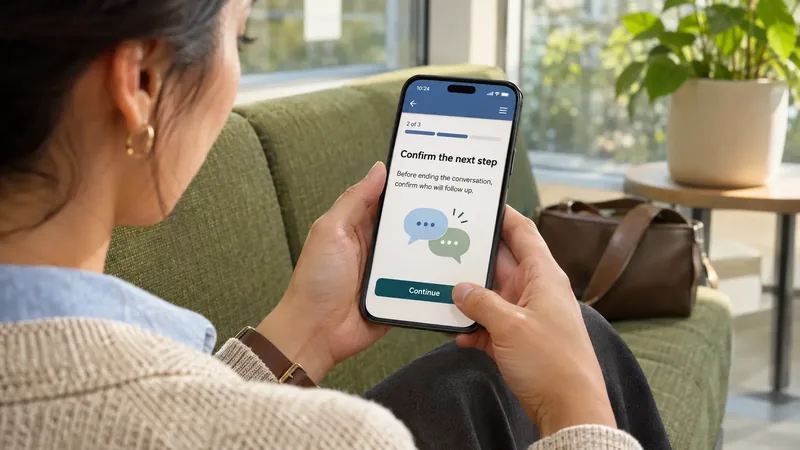
A short lesson can become difficult to follow when its translation is reviewed one screen at a time or minimal context is available. Localized button text may fit the space but describe the wrong action. A compact explanation may lose the condition that makes it useful. A phrase such as “Try again” may refer to a question, a practice activity, or the whole lesson. Mobile microlearning translation needs enough context to preserve those distinctions within a small, connected learning experience.
For this article, microlearning means a short lesson focused on a specific learning objective, not a fixed number of minutes or screens. The assignment may include instructions, examples, controls, feedback, audio, and graphics. This guide helps training and localization decisionmakers prepare those materials and define review responsibilities. Terralíngua expertly supports training-content translation and multimedia adaptation; however, device behavior and learning-platform checks should be scoped separately rather than assumed to follow automatically from translation.
Define What the Short Lesson Must Teach
Begin with the intended outcome: what should the learner understand or be able to identify after completing the sequence? Supply the audience, assumed knowledge, and relevant source references. A lesson introducing a workplace process may use different explanations from a refresher for experienced staff. The translator needs to know which distinctions carry the teaching point, and which wording is simply introductory.
Identify the minimum information needed to preserve that outcome. A shorter translation is not necessarily clearer if it removes who acts, when the action applies, or what happens next. Ask the learning owner to resolve an overloaded source screen before expecting the target language to address it. Localization can expose a content problem, especially with text contraction and expansion added to the issue, but the language team should not redefine the learning objective without approval.
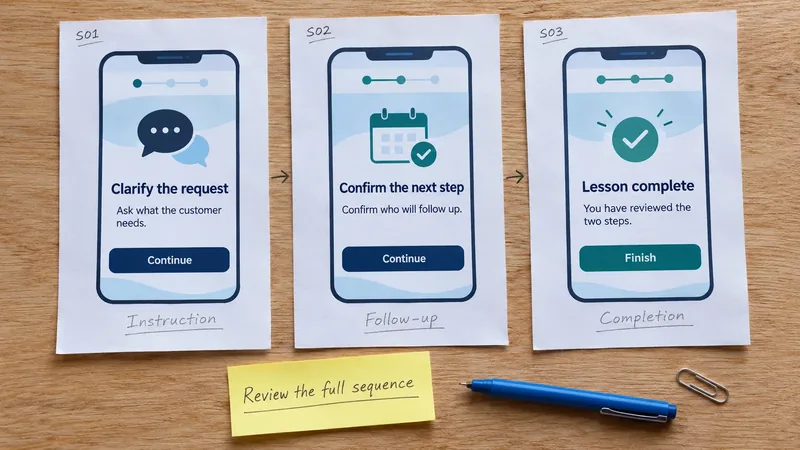
Consider this fictional short customer-service lesson, where the objective is to distinguish clarifying a request from confirming a follow-up action. The first screen introduces the distinction, the second illustrates it, and the last summarizes it. If both actions become the same generic verb in translation, the sequence can remain readable while losing its purpose. This is an example of an issue that a sentence-only review may miss.
Map the Screen Sequence Before Exporting Text
Create a simple map showing the screens in order, including branches and feedback that are not visible on the main path. Assign stable identifiers and show which control leads to which screen. A storyboard, annotated capture, or recording can provide that overview. Keep it aligned with the source version being translated so that the translator does not follow an earlier published design.
- Entry: title, purpose, prerequisite information, and any start control.
- Instruction: the explanation and examples that establish the teaching point.
- Activity: prompts, response choices, hints, and retry behavior where present.
- Feedback: messages associated with each relevant learner action.
- Exit: summary, completion wording, and the next available action.
Include conditions that are easy to overlook, such as a revealed explanation, an unanswered-question prompt, or a second attempt. Establish whether screens should advance automatically or wait for input. If a lesson can be resumed after interruption, show what the learner will view on return. These details help reviewers determine whether phrases such as “above,” “next,” and “again” remain meaningful in the actual sequence.
The map also helps define scope. A lesson may launch from a learning portal whose navigation is separately managed. Identify which labels belong to the lesson and which belong to the surrounding platform. Otherwise, a translated instruction may tell learners to select a control whose displayed name is outside the project scope and remains in another language. Agree how that boundary will be handled before production.
Provide Editable Source Content and Provide a Representative Playback
Supply the authoring source, its software version, linked assets, and an approved published reference when available. Include the text exports to use for translation, but do not assume an export contains everything required in the scope. Words may also appear in images, videos, shared templates, player controls, or hidden feedback layers. Request an inventory of those items and identify the party responsible for extracting and replacing them.
“Representative playback” means a working example that shows how the lesson behaves in its intended setting. Provide access through an approved test arrangement or supply a recording and screenshots when direct access is unavailable. Demonstrate the normal route and important alternate states. A static screen does not reveal whether the learner must scroll, tap a graphic, listen to audio, or wait before continuing.
When only a published lesson is available, ask for an assessment of what can be edited or reconstructed. Do not assume that its contents can be returned in the original authoring format. Agree upon the limitations and final deliverable before translation begins. Also establish whether source materials contain confidential information and provide approved sample data for review rather than copying real learner or private customer details into test screens.
Give Isolated Text a Clear Function
For each short string, explain what it does. “Review” could be a button opening a summary, a heading, or a request to repeat an activity. The same English word may require different forms in another language. Record the screen identifier, text type, surrounding content, and result of the action. These notes are especially useful when the export lists strings alphabetically instead of in lesson order.
Distinguish visible text from internal notes. Stage directions, asset names, and developer instructions should not accidentally become learner-facing copy. Identify variables such as a learner’s name or attempt count and explain whether the surrounding sentence changes with the value. Provide realistic samples, including longer values where relevant, so that both linguistic and layout reviews can assess the final message.
A useful note for “Continue” might say: button on the example screen; opens the summary; does not submit an answer or mark the lesson complete. That gives the translator a concrete basis for choosing wording. If the same label is used elsewhere with a different effect, flag it for the learning owner. Consistency should preserve meaning, not hide different actions behind one familiar word.
Plan for Text Expansion Without Losing Meaning
A short English label does not establish a sufficient space allowance for every language. The World Wide Web Consortium (W3C)’s internationalization guidance explains that translation length and character dimensions vary, and that short strings can pose substantial layout challenges. Treat space limits as design information to assess, not a reason to demand that every translation match the source character count. A fixed percentage allowance is not a guarantee that text will fit.
W3C Internationalization: Text Size in Translation
Provide the actual text constraints where they exist: a maximum field length, a fixed video title area, or a control space that cannot grow. Distinguish hard technical limits from preferences inherited from the English design. The team can then consider a natural shorter expression, an adjusted text area, or a revised source. If an edit changes the teaching point or removes a condition, the learning content owner must approve it.
Do not make smaller font type the default remedy for compact learning screen text. First check whether unnecessary source wording can be removed, the layout can accommodate another line, or a dense screen can be reorganized. These are content and production decisions, not automatic translation service adaptations. Record who can authorize the decisions and whether changes should apply to the source lesson for consistency as well as the target versions.
If splitting a screen is considered, check the whole sequence again. Moving a qualification to a later screen may separate it from the example it explains. Moving feedback may change what the learner sees before making a choice. A layout improvement should not alter the order in which essential information becomes available. Review the revised lesson as a learning experience, not merely a set of text boxes.
Use Repeated Phrases Consistently and Carefully
Short lessons often reuse controls and phrases across many modules. Build a small, approved list with definitions: for example, whether “Retry” repeats the current question or restarts an activity. Reuse established translations when the function is the same. When the meaning differs, preserve separate context and identifiers rather than forcing the same translation solely because the English spelling matches.
Agree on terminology for concepts that recur through the instruction, examples, and feedback. If the lesson teaches the difference between a request and a follow-up action, those terms should remain recognizable throughout. Variation that is introduced only to avoid repetition can weaken the connection. Conversely, repeated praise should not be mistaken for evidence that a response is correct; confirm which feedback belongs to each learner action.
Translation-memory matches can help maintain approved wording, but they still require context review. A sentence retained from an earlier lesson may now precede a different control or describe a changed activity. Supply the current screen reference and flag changes in function even when the source wording has not changed. This keeps reuse useful without turning earlier approval into a blanket approval for every later occurrence.
Keep Instructions Aligned with Visible Controls
A learner should be able to connect an instruction with the control that performs it. Supply the approved labels for buttons, menus, and icons used in the lesson. If a screenshot shows an untranslated interface, agree how the target-language explanation will identify its controls. Avoid referring to a localized label that does not actually appear on the screen being demonstrated.
Check interaction wording in the intended environment. Instructions based on hovering or pressing a keyboard key may not match use. Translators should raise the query of the mismatch rather than assume the product supports an equivalent gesture. The learning or development owner must confirm the available action. Similarly, directional references such as “on the right” need review if the arrangement changes across layouts or language direction.
Visible wording and accessibility labels may be stored separately. Identify both in the source inventory when they are in scope, along with image descriptions and any instructions conveyed through audio. A language reviewer can check their meaning, but this does not replace accessibility evaluation. Agree which content specialist checks are required, and who will carry them out before presenting the lesson as accessible.
Coordinate Audio, Graphics, and Reading Time
If the lesson contains narration or a short video, connect the script to the screen sequence and the visual action. Include subtitles and meaningful text inside graphics in the translation scope. Decide what information must remain understandable when sound is unavailable. Do not assume a translated voice track makes an otherwise untranslated screen usable, or that visible text includes every point delivered in audio.
Approve the translated wording before final narration and media integration wherever practical. Revising a sentence later can change timing and require another render. Review the translated audio and text together when ready to confirm an explanation does not continue after the lesson moves to a different example. Where automatic advance is used, have the owner assess the timing rather than simply retaining the source duration without checking the target version.
Keep essential information out of tiny, flattened graphics where feasible. If text must remain in an image, provide editable artwork and confirm how the localized image will be produced and checked. Review its readability in the lesson, not only at full size in a graphics editor. A clear desktop asset may become difficult to read after the course player scales it for a screen type such as a phone.
Separate Language Review from Device Checks
Define three review areas. Linguistic review checks meaning, terminology, grammar, and clarity. In-context review checks those words alongside the screens and actions they describe. Device and platform checks examine the assembled lesson in specified environments. These areas overlap, but approval in one does not prove that the others have been completed. Assign owners and evidence for each agreed upon area.
For device checks, name the phones or representative viewport sizes, operating systems, browsers or apps, and orientations to be tested. Include established text-size settings and relevant interaction states. Check for clipping, hidden controls, unwanted overlap, and content that becomes unreachable. Record the environment with each finding so the production team can reproduce it instead of relying on a screenshot with no context.
W3C’s explanation of Web Content Accessibility Guidelines (WCAG) reflow describes presenting content without losing information or functionality as the available space changes, with stated exceptions. This is useful background for web-based learning, not proof that a particular lesson conforms to WCAG. Translation alone does not create responsive behavior. Where reflow or other accessibility requirements apply, have the responsible technical team define and validate the implementation.
W3C Web Accessibility Initiative (WAI): Understanding Reflow
A learning management system, or LMS, also needs its own agreed upon checks. Launching a lesson, resuming it, and recording completion may depend on the package and host configuration. State who publishes the localized package, uploads it, and verifies those outcomes. Do not describe translation delivery as LMS integration unless that work has been included and completed.
Use a Representative Lesson to Set Acceptance Criteria
Before localizing a large collection, conduct a pilot containing representative main text and media challenges: a short instruction, a repeated control, feedback, and a constrained layout. Review the target-language build with the intended owners. The pilot should resolve terminology, context gaps, and production questions. It should not be treated as evidence that every module or device has already passed review.
- Learning meaning: the objective and essential conditions remain intact.
- Sequence: references and feedback make sense at the moment they appear.
- Controls: instructions identify the actual visible action.
- Presentation: agreed layouts show readable text without hidden content.
- Media: narration, subtitles, and graphics refer to the same information.
- Delivery: the language version and source revision are identifiable, with testing responsibilities recorded.
Log findings by screen identifier and language, then distinguish linguistic corrections from source, layout, and functional issues. Assign a content owner and review the correction in the relevant context. Where a problem falls outside scope, document it, and obtain a release decision from the responsible owner. Silence in a review thread should not be treated as confirmation that an unresolved issue is acceptable.
Scope the Delivery Needs Before Requesting an Estimate
Provide the number of lessons, target languages, source formats, media inventory, and intended release date for estimating purposes. Identify lesson shared text, and the expected client review process. Effort depends on more than simply total word count: items such as hidden states, unavailable source files, layout constraints, and repeated media changes can materially affect production effort and turnaround time. Agree whether delivery means translated text, rebuilt lessons, media assets, or a combination, and identify the checks included.
Terralíngua’s ISO certified multimedia services translate and localize training materials (including on-screen text, subtitles, narration, and interactive content) with capabilities in Articulate Storyline and Adobe Captivate. Our expert capabilities provide a basis for discussing the best approach for a short lesson localization; however, our expertise does not imply support for every platform or automatic device optimization. Confirm the authoring format, production options, and required validation for your materials.
Start with evaluating one approved lesson, its editable sources, a representative playback, and the screen map. Add approved terminology, target languages, device expectations, and the reviewers available to resolve questions to the project consideration. This allows the language and production work to be assessed together while keeping learning approval, technical behavior, and LMS responsibilities with the appropriate parties. The aim is a short lesson that remains understandable as a whole consideration, not simply a collection of compact translated phrases.
Discuss Training and Multimedia Localization with Terralíngua