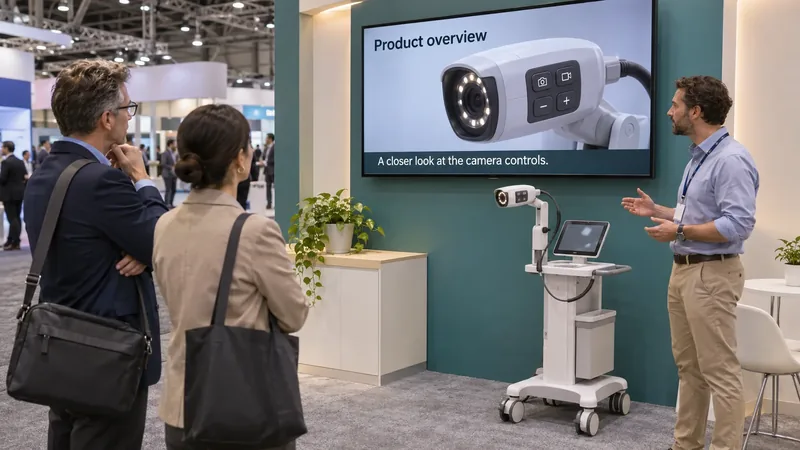
A medical product demonstration may have only a few moments to communicate its purpose before an exhibition visitor moves on. The screen may be muted, a presenter may be speaking nearby, and viewers may arrive halfway through the video. Medical trade show localization must account for these conditions while preserving the product names, technical meaning, and approved claims that the manufacturer intends to communicate.
The assignment is broader than translating a voiceover. It can involve multilingual exhibit scripts, product demonstration subtitles, narration, title cards, and text inside graphics. For decisionmakers planning an international event, the key question is how to turn those pieces into a coherent, reviewable presentation. Terralíngua’s multimedia services include translated on-screen content, subtitles, and synthetic voice narration; with the required production work and formats for the specific exhibit.
Define the Viewing Conditions Before Translation
Start with the audience and the presentation setting. A professional audience might include clinicians, procurement teams, distributors, or technical specialists, each approaching the product with different questions. Identify the intended viewers without the assumption that everyone shares the same specialty vocabulary. Also state whether the demonstration introduces a product, illustrates selected features, or supports a scheduled conversation with an exhibitor.
Describe how the material will be shown: an unattended screen loop, a presenter-led demonstration, an interactive kiosk, or an appointment on a tablet. Confirm whether sound is available and whether the viewer can choose a language. These choices affect the amount of text, the timing, and the navigation needed. A single video should not be assumed suitable for every setting merely because its translation is accurate.
Keep the scope distinct from operational training. A short exhibit presentation may show selected actions without teaching a complete procedure. Have the manufacturer identify the intended purpose and any necessary limitations. Translators should not fill gaps with inferred operating advice, and production teams should not remove essential context to make the demonstration more concise. The approved exhibit purpose and content should guide every language version.
Language and market are separate decisions. A Spanish-language version prepared for one event should not automatically be reused at another location with different product availability or familiar wording. Record where each version is intended to appear, which model it shows, and whether later website or social-media use would be suitable. If the presentation will be repurposed after the show, have the owner confirm the new environment context before publication. This prevents an event-specific approval from becoming an assumed authorization for every future channel.
Build an Approved Source Package for Medical Trade Show Localization
Provide the final reference video together with editable production files where available. A script alone will not show text embedded in graphics, a label visible on the device, or a qualification displayed only briefly. Use a scene-by-scene inventory to connect the spoken words, visible text, and product action. Identify the source version so that later edits can be traced to the correct sequence.
- Video and production assets: reference render, editable timeline, linked graphics, and separate audio tracks where available.
- Language materials: approved script, existing subtitle files, terminology, product-name rules, and pronunciation guidance.
- Review references: applicable product information, approved promotional wording, and identified market-specific limitations.
- Exhibit requirements: screen orientation, player details, sound conditions, language selection, and event deadline.
- Approval contacts: technical reviewer, promotional or regulatory reviewer, and owner of the final production release.
Mark each asset with identifiers such as “translate”, “retain unchanged”, “adapt with approval”, or “reference only”. This especially matters for product interfaces and labels that cannot be edited or changed in the actual device. It also prevents a production supplier from treating a reference brochure as an approved new exhibit copy. Ask early about missing source files: as recreating flattened graphics or replacing text in a finished video may require additional work and may have limitations.
Separate Technical Accuracy from Promotional Approval
Technical review asks whether the words and images accurately describe the product shown. Promotional review asks whether the complete presentation and its claims are acceptable for the intended audience, market, and use. A technically correct feature description is not automatically approved exhibit copy. Specifically assign responsibilities, even when the same person coordinates the feedback.
For a US regulatory example, the Food and Drug Administration (FDA) explains that false or misleading device labeling can result in misbranding and that misleading representations can involve wording, design, and omitted material facts. This is a reason to review the combined presentation, not just the translated sentences. It does not establish which rules apply to every trade-show asset. The manufacturer’s qualified reviewers must determine the applicable requirements for the product and jurisdiction.
FDA: Device Labeling and Misbranding
Preserve the strength and boundaries of the approved content language structure. A statement that a feature “supports” a task should not become a promise that it guarantees an outcome. A limitation tied to a model or configuration should not disappear because the translated sentence is longer in the available space. If a more natural target-language phrase changes the apparent claim, return the choice for approval instead of treating it as an ordinary stylistic preference.
Create a short claims record connecting sensitive wording to its approved source and reviewer. Include qualifications and where they must appear, not only the headline statement. When reviewers authorize a change, record whether it applies to narration, subtitles, graphics, or all three. The language provider can identify any ambiguity and preserve the approved meaning; however accurate translation itself does not authorize promotion or establish regulatory compliance.
Make a Muted Demonstration Understandable
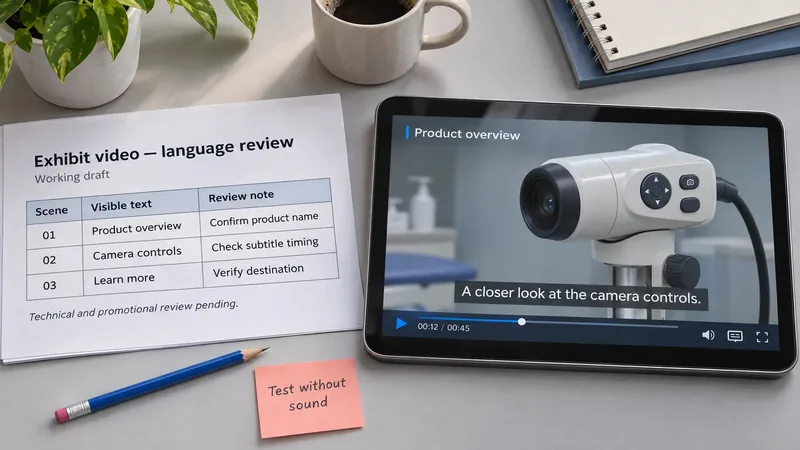
Review the video with the audio off before deciding how much localization is needed. Can a viewer identify the product, understand what the scene is showing, and recognize any limitation relevant to that message? If essential meaning exists only in narration, translating the visible title cards will not create a usable silent-screen version. Decide what information must be conveyed by subtitles or other approved on-screen text.
An exhibit loop also needs to accommodate viewers who miss its opening. Consider a fictional demonstration of an examination camera. A close-up caption saying, “This makes it easier” has little meaning if the visitor did not hear the preceding explanation. A product-approved scene label identifying the feature being shown can provide context. Any rewritten wording should be approved as source content before it is reproduced across languages.
Avoid solving the problem simply by placing the entire script on every screen. Let the visuals carry what they clearly show and use text to identify the relevant action or explanation. Keep qualifications associated with their claims rather than separating them into a distant closing frame. The responsible reviewer should decide whether a scene can stand alone or requires additional context; the editor should not assume that a small footer resolves every issue.
Test the loop from several entry points, including a scene transition and the final frame. Check whether a viewer can tell that a new sequence has begun and whether the ending directs them toward a useful next step. A screen loop and a presenter-led version may need different approved edits. Treat them as separate deliverables when their content or timing differs, rather than changing files informally at the booth.
Prepare Product Demonstration Subtitles for the Screen
Subtitle translation must work with time as well as space. A translated sentence may take longer to read in another language, especially when the viewer is also watching a product action. Review subtitle breaks and text duration against the picture timing. Where adjustment is needed, consider extending the scene or revising the approved source rather than dropping a qualification or displaying dense text too quickly.
Specify whether subtitles will be automatically visible in the video or supplied as a separate file option that the player displays. A permanently rendered version can avoid dependence on a subtitle setting, but each language needs its own render. A separate track may support language choice, provided the actual player correctly handles it. Neither option should be selected without checking the exhibition playback arrangement.
Keep the accessibility scope clear. World Wide Web Consortium (W3C) distinguishes translated subtitles from captions that also convey meaningful non-speech audio, while noting that terminology varies by region. Translating dialogue alone therefore does not establish that all accessibility needs are met. Identify the required caption content and other accommodations with the project owner and then agree upon the corresponding production and validation work.
W3C Web Accessibility Initiative (WAI): Captions and Subtitles
Review the rendered subtitles at the expected display size and viewing distance. Check contrast, line breaks, unsupported characters, and whether text obscures a control or label being demonstrated. A subtitle that looks acceptable on an editor’s monitor may be difficult to follow from a viewer on an aisle. Use the event screen or a representative setup when possible and record any limits of the test.
Keep Product Names and Graphics Recognizable
Create a product-name list that distinguishes brand names, model identifiers, feature names, and ordinary descriptive terms. State which should remain unchanged, and which have approved localized forms. Include capitalization considerations and any required trademark treatment supplied by the owner. A translator should not invent a local product name or substitute a familiar term that could make viewers identify a different model.
When the device screen remains in its original language, decide how translated narration and subtitles will refer to the visible controls. The wording should allow a viewer to connect the explanation with what is shown. Supply clear reference images and the approved interface vocabulary. Do not replace a label in the video with a translation that suggests the physical exhibit or product interface offers a language it does not actually support.
Graphics adaptation may require more than replacing words. Longer labels can collide with arrows, captions can cover a detail, and a translated heading may force a different arrangement. Provide editable artwork and the fonts or licensing arrangements needed for production. Keep callout relationships intact and have the technical reviewer check that the resulting visual still identifies the intended feature. Agree which adaptations require approval.
Choose Narration Around the Demonstration
Narration can be useful for scheduled presentations or individual viewing with sound, even when the aisle screen runs silently. Decide which versions need audio rather than producing voice tracks automatically for every language. Supply pronunciation guidance for product names, abbreviations, and specialist terms. Approve a short sample containing difficult items before committing to a full recording or generated track.
Terralíngua provides expert synthetic narration and native-speaking linguistic review of pronunciation and phrasing for multimedia needs. Confirm which approach and process will suit the material and the requested production scope. If a different recording approach is required, ask about available arrangements rather than assuming it is included. The choice should reflect the audience, tone, terminology, and ability to revise the presentation.
Approve the translated script before final audio production wherever practical. A later text change can affect duration, subtitles, and the position of a graphic or demonstration cut. Review the narration together with the picture as a sentence should not describe a feature after the video has moved to another image. Avoid forcing the voice to run unnaturally fast simply to fit the original edit.
Prepare Presenter Copy Without Encouraging Improvisation
For a live demonstration, distinguish the spoken script, stage directions, and optional approved answers. A cue such as “pause while the image rotates” is not audible narration and should remain identifiable in the translated document notes. Supply the sequence of actions and the intended duration. Multilingual exhibit scripts should help presenters connect their words to the demonstration without turning internal production notes into audience-facing claims.
Identify how presenters should handle questions outside the approved material. The manufacturer may provide a reviewed response or a referral to an appropriate specialist. Translators can render those responses but should not create medical answers or extend the product’s intended use. If live interpretation is needed, scope it separately from script translation and confirm arrangements rather than assuming a translated script supplies that service.
Review One Complete Language Version Before Scaling
A short pilot can reveal problems that remain hidden in separate files. Choose a representative sequence containing a product name, a claim with a qualification, and an important visual action. Review the translated script, subtitles, graphics, and any narration together. Use the findings to settle terminology and production decisions before applying them throughout the remaining languages.
Assign findings to their proper owners. A mistranslated feature name needs linguistic correction and terminology confirmation. A subtitle covering a button needs a layout adjustment. An unsupported claim needs a decision from the designated promotional reviewer. Track each issue by scene or timecode, identify the affected language versions, and resolve it against a corrected render rather than sending an email promising it will be fixed.
- Meaning: approved technical statements and qualifications are preserved.
- Recognition: product names, models, and visible controls remain identifiable.
- Silent viewing: the agreed message can be followed without narration.
- Timing: subtitles and audio match the relevant scene.
- Presentation: graphics and text are readable and do not hide important details.
- Approval: the final combined version has the required client signoffs.
Deliver Files the Exhibit Team Can Use
Agree on the playback specifications with the exhibition or audiovisual team before the final export. Confirm resolution, orientation, file format, audio requirements, subtitle support, and whether playback depends on a network connection. Where external subtitle files are used, test them with the video on the intended player. A file opening successfully on an office laptop does not establish that the booth system will display the content as intended.
Use clear filenames identifying language, presentation variant, and revision. Supply a delivery register showing which file belongs on each screen or device. Keep previous versions out of the active playback folder, and identify the person authorized to replace a file. Retain approved editable sources for updates. A last-minute distributor edit should enter the review process rather than become an untracked new language version.
Build the schedule backward from the technical rehearsal or file handover, not when the quote was approved. Allow time for client reviews and corrections after integration. Effort depends on language word count, screen text, editable assets, narration choices, and the number of presentation variants. Provide those details when requesting an estimate so that the assessment covers the production work as well as the required translated words.
Plan the Language Work Before the Event Deadline
For a medical exhibit, discuss script translation, subtitles, narration, and the graphics adaptation as a connected package. Terralíngua’s ISO certified multimedia capabilities provide a starting point for the conversation that will confirm the specific files, production options, and required review responsibilities. The client’s technical and promotional reviewers retain approval of product meaning and claims, while the contracted language work supports a coherent presentation across versions.
Send the reference demonstration, editable source assets, approved script and claims, target languages, audience description, and event deadline for evaluation. Include the playback conditions and identify whether the screen will run silently, with a presenter, or both. These inputs make it possible to assess the actual exhibit experience and define deliverables that the booth team can deploy with clear version control.