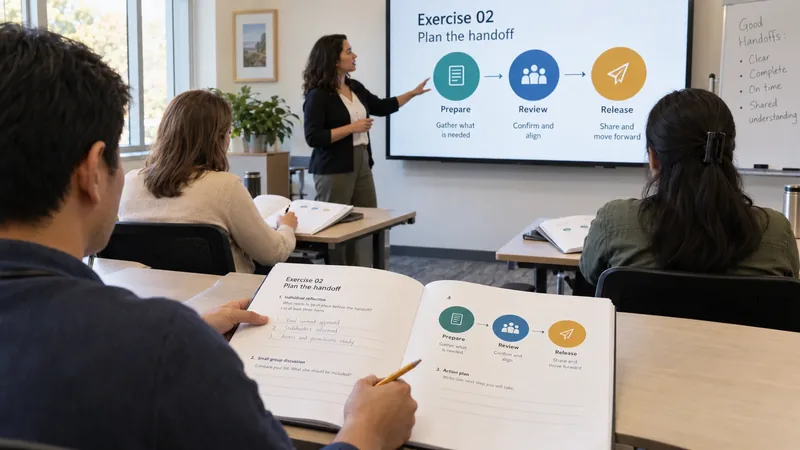
A class participant turns to the workbook page shown on the slide, but the exercise has a different name. The instructor has the correct answer in the facilitator notes, yet those notes refer to an earlier version of the activity. Each translation may read well on its own; yet the localization teaching session becomes difficult to deliver. Instructor-led material translation needs to preserve the connections between what learners see, what they hear, and what they are asked to do.
For a training manager commissioning several languages, the practical question is how to receive a coordinated teaching package rather than a collection of translated files. Terralíngua’s ISO certified training translation services cover presentations, facilitator notes, participant workbooks, exercises, and handouts. Our multilingual desktop publishing services also expertly address document layout. Together, these capabilities are relevant to preparing materials that instructors and learners can use as a set, with the exact production scope agreed upon for the project.
Terralíngua’s eLearning and training localization services
Define the Instructor-Led Material Translation Scope
Start with the session itself. Identify who will teach it, which language they will speak, which languages participants read, and whether delivery is in person, virtual, or blended. A bilingual instructor using translated workbooks has different needs from an instructor delivering the entire session in the target language. Do not assume that the language represented on the slides should determine the language of the facilitator notes.
Inventory the complete teaching package: slides, embedded speaker notes, a separate facilitator guide, participant workbooks, exercise sheets, answer keys, role cards, and take-away resources. Specifically identify optional modules and hidden slides. A hidden slide may be intentionally obscured for later questions, or it may be obsolete material; the content owner must decide. Include any visible wording in diagrams or screenshots that learners must use during an activity.
Mark each component for translation, retention, replacement, or reference only. For example, a demonstration may use an English-only application while the explanatory material is localized. Translators need to know that visible interface labels must remain as they are. Record whether videos and other media require separate translation work. This scope concerns prepared written training materials; it does not imply live interpreting, delivery of the workshop, or certification of trainers.
Map Connections Before Translation Work
Create a simple alignment register that connects each activity with its slide, instructor instructions, workbook location, and answer key. Use stable activity identifiers alongside page and slide numbers. An identifier such as “EX02” can remain the same or change when a translated workbook gains a page or the slide deck gains an introductory slide. Numbers alone are fragile references when materials are independently edited.
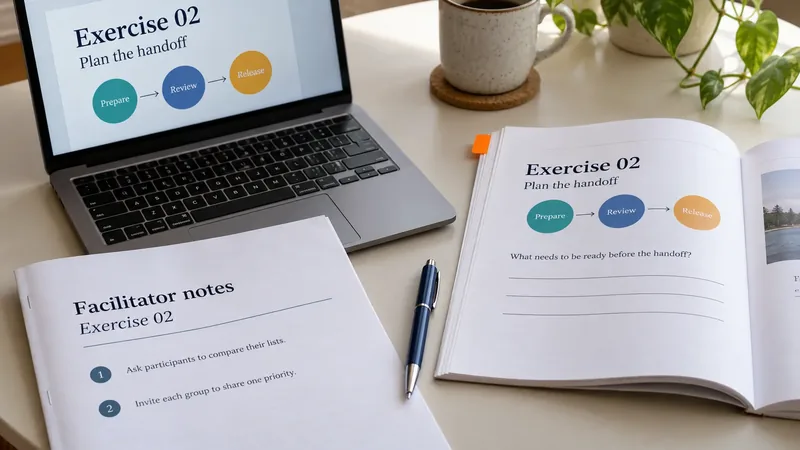
In a sample scenario, a handoff workshop “EX02” asks participants to identify what must be completed before work moves to another team. The slide introduces the task, the workbook provides space for three priorities, and the facilitator guide explains how to compare responses. If one file changes the task to ranking five priorities instead of three, the others need review. That is an instructional change, not a translation choice that should be made without confirmation.
- Activity identifier and approved activity title
- Source slide number, workbook section, and facilitator-note location
- Participant instruction, expected response, and debrief reference
- Language version, source revision, and unresolved decisions
Keep the translation query and term register short enough to maintain. It need not reproduce every sentence. Its purpose is to show dependencies so reviewers can check a complete activity together. Before sending files, resolve contradictory instructions or flag them as open questions. Translating several incompatible source versions will reproduce the inconsistency in more languages.
For multiple audiences, add a language matrix showing which components each group receives. One cohort might need Spanish slides and workbooks with English instructor notes; another might need the entire package in Portuguese. Record those combinations explicitly. Otherwise, a supplier may translate material that was meant to remain unchanged or omit notes that a local instructor needs. Also distinguish regional variants where terminology or examples differ.
Separate Spoken, Student Displayed, and Instructor-Only Content
A slide heading, a spoken explanation, and a teaching cue serve different purposes. The heading should be easy to view. A spoken explanation should sound natural when read aloud. A cue such as “Pause for individual reflection” tells the instructor what to do and should not become part of the speech. Label these functions in the source so the translator can preserve them.
Microsoft documents that PowerPoint Presenter View can show speaker notes on the presenter’s computer while displaying the slides on the audience screen. This distinction matters when scoping a deck: translating the visible slides does not automatically address everything the instructor uses. Inspect the notes separately and confirm the intended display arrangement during rehearsal, particularly if the instructor shares a screen in a virtual session.
Microsoft: Present slides while viewing speaker notes
For facilitator note localization, distinguish required wording from suggested phrasing. A mandated policy statement may need an approved translation, while an introductory question may allow natural variation. Preserve that distinction visibly through consistent labels. Identify pronunciation guidance, timing cues, anticipated questions, and optional explanations. Do not turn every note into a script unless that is the agreed upon delivery model.
Treat answer keys and debrief guidance as instructor-only material when appropriate. Confirm that participant exports do not accidentally contain answers or confidential teaching notes. Conversely, do not remove an instruction from the workbook simply because the instructor is expected to say it. The learning owner should decide what participants need to complete an exercise and what they should retain after the session.
Use Consistent Terms Without Making Every Sentence Identical
Create a focused terminology reference for activity names, process stages, job roles, product names, and recurring instructions. When the slide says “handoff,” the workbook and facilitator guide should point to the same concept. A translator may use different sentence structures for spoken and written material while keeping the concept consistent. Consistency means shared meaning and recognizable references, not necessarily mechanical repetition.
Give translators the audience’s experience or reading level and the terminology familiar at work. A local term to the headquarters audience may be unfamiliar to newly appointed distributors. Identify abbreviations that need explanation and interface labels that must stay in the source language. If learners will use an untranslated support aid afterward, provide it as a reference and agree on how its terminology will be introduced with the localized content.
Examples also need decisions. A joke, a sports analogy, or a role title may not carry the same meaning in another market. The language team can flag the problem and propose wording, but the learning owner should approve replacements that alter the situation or expected behavior. Keep the exercise objective explicit so an appealing local example does not inadvertently teach a different lesson.
Provide Editable Files to Compare
Supply the source presentation and workbook files, linked graphics, templates, and reference PDFs showing the final approved appearance. Identify software versions and fonts, sharing font files only where licensing permits. Include editable diagram text where available. If only a PDF is available, ask for a sample extraction or reconstruction rather than assuming that the original document structure can be recovered without additional time or work.
Check embedded notes before handoff. They may contain old wording, comments meant for the author, or a different version of an exercise. Provide the facilitator guide even when much of its text repeats the slides: the repeated passages need context, and the additional teaching instructions need to be included in the scope. Clearly identify approved source content and material supplied only for background.
A representative sample should include a content dense slide, a long instructor note, and a workbook activity with its answer key. Reviewing these together exposes issues that a simple word count misses, such as embedded graphics or tightly constrained response areas. Agree on whether translations will be returned as text for your team to place, as formatted files, or as both.
Approve the sample’s conventions to apply as a connected set before its insertion throughout the course. For example, decide whether the activity identifier appears in the slide footer, the workbook heading, or the instructor guide margin. Confirm how optional prompts and mandatory instructions are differentiated. This early decision gives translators, layout specialists, and client reviewers a common reference and reduces delays over presentation conventions.
Usable Multilingual Participant Workbooks
Multilingual participant workbooks must allow learners enough room to complete tasks. When an instruction grows longer with text expansion, the response space should not be removed to preserve the original page count. Decide which elements are flexible: text frames, page breaks, worksheet length, and illustration positions. An extra page can be preferable to smaller font type, but any resulting references need to be updated across the package.
Evaluate slides for viewing at the learner’s presentation distance, not only on an editor’s monitor. Check line breaks in activity titles and labels inside diagrams. If a slide becomes crowded, the learning owner may approve a split or shorter wording that preserves the instruction. Moving essential information into the speaker notes area is a content decision because participants may no longer see it.
For printed workbooks, confirm page size, binding, printing requirements, and any intentionally blank pages. For digital workbooks, specify whether participants need an ordinary PDF, an editable document, or fillable form. Accessibility requirements, including document structure and reading order, need a specific production and validation scope. A visually acceptable translated format does not establish that the final file is accessible.
Multilingual desktop publishing and document layout
Assign Instructional Content Ownership
Name a learning owner who can approve changes to objectives, activities, timing, and the teaching sequence. Identify subject specialists for technical or policy questions and a target-language reviewer for terminology and audience fit. The instructor should test whether the notes are practical to use. These responsibilities may belong with fewer people in a small project, but the decisions still need clear owners.
Separate corrections from preferences in review feedback. A wrong cross-reference is a correction. A proposed new exercise is an updated scope change. A preferred synonym may be acceptable, but reviewers should check its use across the slide, workbook, and guide before replacing it. Consolidate feedback into one approved set so contradictory comments do not send each file in a different direction.
Record substantive questions with the affected activity identifier, the item needing clarity, the proposed resolution, and the approving owner. If the source is unclear, resolve that issue before addressing the language problem. The client retains responsibility for instructional validity and subject-specific content. A translated version does not authorize a changed procedure or confirm that a course meets a certification requirement.
Review the Translated Content in a Trial Session
After language and layout review, run a short rehearsal using the translated deliverables. The instructor follows the localized notes, displays the slides, and asks a reviewer to complete selected workbook tasks. Include a complex activity, a cross-reference, and any material that depends on a demonstration. This is a practical way to uncover mismatches that remain invisible rather than when each file is checked alone.
Ask the participant reviewer to work from the materials without being told where a mismatch is suspected. Test how the reviewer views the exercise, understands the requested response, and locates the next step. Record any confusion and its source rather than only asking whether the language sounds acceptable. A clear sentence can still fail if it sends the learner to the wrong activity or assumes information available only to the instructor.
- The same activity identifier and meaning appear in the slide, workbook, notes, and answer key.
- Instructions specify the same task, number of responses, and expected sequence.
- Spoken wording is usable, and instructor cues are clearly distinguished from participant-facing content.
- Page references, hyperlinks, diagrams, and retained interface labels point to the intended material.
- Text is readable in the delivery format, and response areas remain usable.
- Instructor-only material is absent from participant deliverables unless inclusion is approved.
- Client decisions and agreed review comments have been incorporated in every affected file.
Check session content timing through presentation delivery rather than assuming the localized source schedule will remain unchanged. Reading, explanation, and discussion may take different amounts of time in another language or with another audience. If the rehearsal exceeds the allowed time, the learning owner should choose what to adjust. Translators should not remove instructions or shorten content to create a similar timetable.
Agree on Deliverables, Schedule, and Future Updates
Specify the required outputs for each language: an editable slide deck with notes, an instructor guide, a participant workbook, exercise sheets, answer keys, and final PDFs. Identify who will produce final print files or digital forms. Keep instructor and participant packages clearly named. Include the approved terminology list and style alignment register if they are part of the handoff, along with any unresolved limitations.
Effort depends on more than the number of slides. Handling long instructor notes, correcting inconsistent text, addressing embedded artwork, retrieving missing source files, fixing workbook formatting, and the number of review rounds all affect the turnaround time. Reviewer availability and the date of the first scheduled class also matter. Build the delivery date plan around file preparation, language decisions, formatting, client review, and rehearsal rather than requiring a completion date based on word count alone.
For later revisions, send the changed source package and identify the affected activities. A workbook edit may require a slide reference and facilitator instruction to change as well. Preserve the approved previous version for comparison, then release the revised materials together. Instructors should be able to identify which files belong to the current session without combining an old answer key with a new workbook.
If the same program also includes self-paced modules, treat their authoring files and interactions as a separate production component. The shared terminology can support consistency, but a synchronized classroom package and a functioning interactive course require different checks.
Preparing Articulate and Adobe Captivate courses for localization
Frequently Asked Questions
Can We Translate the Workbook but Keep the Slides in English?
Yes, if that arrangement suits the audience and is approved by the learning owner. Define how translated instructions will refer to English slide titles and labels. Reviewers should test whether participants can follow the learning references without having to guess which term on the screen matches the workbook.
Should Every Language Have the Same Workbook Page Numbers?
Only if that requirement is practical and agreed upon in advance. Different page counts can be managed with stable activity identifiers and language-specific page references. If matching pagination is essential for delivery, assess the sample layout before translation begins and avoid achieving it through unreadably small font text or removed response space.
What If the Instructor Wants to Change a Translated Example?
Have the learning owner approve the change, then check all related materials. An improvised example may be acceptable, but it can also change what participants are expected to learn or answer. Record approved reusable changes so future sessions and other language versions can be consistently reviewed.
Plan a Coordinated Training Package
To discuss instructor-led materials with Terralíngua, provide the editable slides and notes, facilitator guide, participant workbook, target languages, audience profile, delivery format, and deadline. Include a representative exercise and its answer key. These inputs help define the presentation translation scope, training adaptation, and document layout needed. This information will be used together with the client contacts and approvals required before the final materials are approved.
Request a quote for translating instructor-led training materials